Payment Links
Payment Links allow you to generate a hosted payment form or invoice without additional overhead. A Payment link is a unique URL that directs a customer to a payment page to complete a transaction. Payment links provide a secure and straightforward method for collecting payments via channels such as email, messaging apps or social media, without requiring customers to navigate the business's website or app.
Monoovas Payment Links service API provides endpoints for creating payment links, managing transactions, and handling PayTo (Australian real-time payment) agreements. The payment links service supports both card payments (Apple Pay, Google Pay, Visa, Mastercard, American Express) and account-to-account PayTo payment.
Sample Payment Links user journey
- A user is required to pay or is issued an invoice via the client's system (entry point)
- Payment Link URL is sent to the user (e.g. via SMS, email or other method)
- The user clicks the payment Link and is taken to a payment page.
- The user selects their payment method.
- Payment is made, and the UI redirects to the ‘success’ URL.
- The relevant payment notification is sent to you via webhook.
- Payment is settled to your mAccount.
Merchant API integration guide
Register your account
Call the Register Account endpoint
- Endpoint: POST /api/payment-links/register-account
- Authorization: Bearer <monoova_account_bearer_token>
Success: registration with Monoova is complete. This is mandatory before creating payment links.
Create Payment Links
Start creating payment links. At least one payment method must be enabled (either a card or payTo).
- Endpoint: POST /api/payment-links
- Authorization: Bearer <monoova_account_bearer_token>
Returns: Payment Link URL for customers. Bearer token is automatically stored securely.
Optional: update account
There might be some updates on the PLS that require the merchant to hit this endpoint. Only use this if advised by Monoova. Call the Update Account endpoint.
- Endpoint: POST /api/payment-links/update-account
- Authorization: Bearer <monoova_account_bearer_token>
Success: updating the account returns the subscription ID.
To test card payments and PayTo using Payment Link in Monoova's Sandbox, ensure your mAccount is authorised by Monoova for these payment methods.
For detailed information on the Payment Link API, refer to the API documentation.
Payment Links integration flow
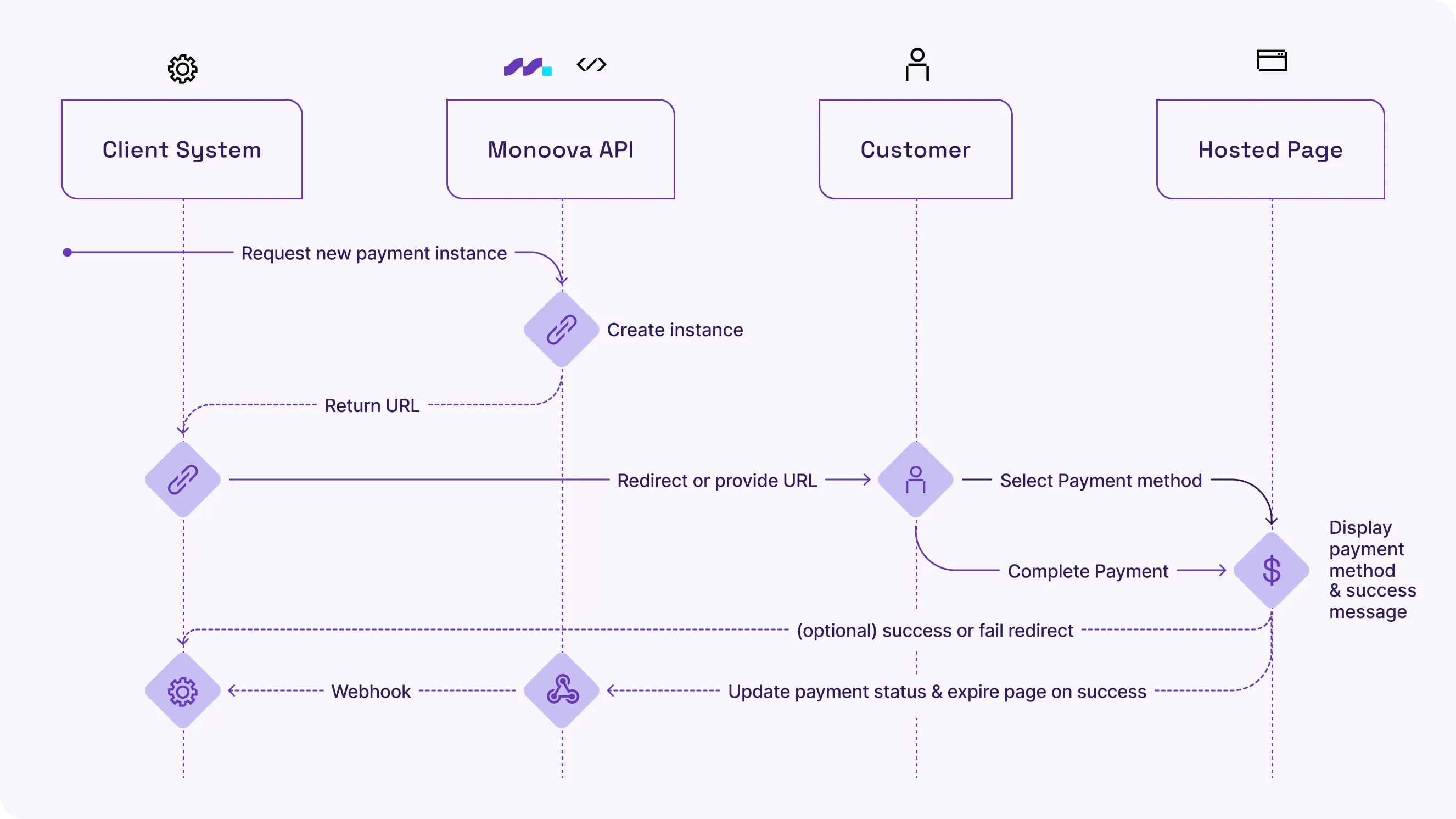
Merchant configuration settings
The following settings are configurable by the merchant as part of the card payment setup.
General controls the basic display of the card payment option on the checkout page — including the payment method title and description shown to customers.
Variable | Default | Description | Affects |
|---|---|---|---|
card_title | Credit / Debit Card | Payment method name displayed to customers | Checkout UI |
card_description | Accept payments via Mastercard, Visa, Apple Pay and Google Pay | Short description shown below the title | Checkout UI |
Payment behaviour controls how payments are captured, whether card saving is enabled, and surcharge settings.
Variable | Default | Description | Affects |
|---|---|---|---|
capture | yes | If yes, payment is captured immediately. If no, only authorisation is placed | Payment processing |
saved_cards | yes | Allows customers to save card details for future checkouts | Checkout UI, tokenisation |
apply_surcharge | no | If yes, a surcharge fee is added to the order total | Order total, payment processing |
surcharge_amount | 0.00 | Surcharge value (percentage or fixed). Applied only when apply_surcharge is yes | Order total |
Payment method controls which digital wallet payment options are available to customers at checkout.
Variable | Default | Description | Affects |
|---|---|---|---|
enable_apple_pay | yes | Shows Apple Pay button for eligible customers (Safari / Apple devices) | Checkout UI |
enable_google_pay | yes | Shows Google Pay button for eligible customers (Chrome / Android devices) | Checkout UI |
enable_express_checkout | no | Enables one-click express checkout using saved cards or digital wallets | Checkout UI, checkout flow |
The checkout button controls the label on the payment submit button inside the card form.
Variable | Default | Description | Affects |
|---|---|---|---|
order_button_text | Pay with Card | Label displayed on the payment submit button | Checkout UI |
The express checkout button appearance only applies when enable_express_checkout is yes. Controls the visual appearance of the express checkout button.
Variable | Default | Description | Affects |
|---|---|---|---|
express_button_color | primary | Colour theme of the express checkout button. Values: primary, dark, light | Checkout UI |
express_button_height | 48 | Height of the express checkout button in pixels | Checkout UI |
express_button_border_radius | 4 | Corner roundness of the express checkout button in pixels | Checkout UI |
Card form styling controls the visual styling of the Primer-rendered card form embedded at checkout. Note: focus state (blue outline), error state (red text), and disabled button state (grey) are fixed and not configurable.
Input labels (e.g. "Card Number", "Expiry Date", "CVV")
Variable | Default | Description |
|---|---|---|
input_label.font_family | Helvetica, Arial, sans-serif | Font family for input field labels |
input_label.font_size | 14px | Font size for input field labels |
input_label.font_weight | normal | Font weight for input field labels |
input_label.color | #000000 | Text colour for input field labels |
Input Fields
Variable | Default | Description |
|---|---|---|
input.font_family | Helvetica, Arial, sans-serif | Font family for text inside input fields |
input.font_size | 14px | Font size for text inside input fields |
input.font_weight | normal | Font weight for text inside input fields |
input.text_color | #000000 | Text colour inside input fields |
input.background_color | #FAFAFA | Background colour of input fields |
input.border_color | #E8E8E8 | Border colour of input fields |
input.border_radius | 8px | Corner roundness of input fields |
Submit Button
Variable | Default | Description |
|---|---|---|
submit_button.font_family | Helvetica, Arial, sans-serif | Font family for the submit button label |
submit_button.font_size | 17px | Font size for the submit button label |
submit_button.font_weight | bold | Font weight for the submit button label |
submit_button.text_color | #000000 | Text colour of the submit button |
submit_button.background | #2ab5c4 | Background colour of the submit button |
submit_button.border_color | #2ab5c4 | Border colour of the submit button |
submit_button.border_radius | 10px | Corner roundness of the submit button |
Payment Link API — Card Request Fields
The following fields are part of the CreatePaymentLinkRequest API and are already implemented in the Payment Link Service. These are the optional fields available to merchants when creating a payment link via the API, covering payment link behaviour, payer pre-fill, branding, and card-specific settings.
Top-Level Fields: these fields control the general behaviour of the payment link — including currency, expiry, bank statement narrative, payer details, and branding. All fields are optional.
Variable | Type | Default | Description | Affects |
|---|---|---|---|---|
Currency | string | AUD | ISO 4217 currency code. Supported: AUD | Payment amount display |
Narrative | string | null | Text shown on the payer's bank statement | Bank statement |
Expiry | DateTimeOffset | 24 hours | When the payment link expires. Must be in the future | Link availability |
Payer | object | null | Payer's personal and billing information. Pre-fills the payment form | Checkout form |
Branding | object | null | Inline white-label branding for the payment page | Payment page UI |
Payer: these fields allow merchants to pre-fill the customer's personal and billing details on the checkout form, providing a smoother checkout experience.
Variable | Type | Default | Description | Affects |
|---|---|---|---|---|
FirstName | string | null | Payer's first name | Checkout form |
LastName | string | null | Payer's last name | Checkout form |
EmailAddress | string | null | Payer's email address | Checkout form, receipts |
BillingAddress.Suburb | string | null | Suburb / city | Billing address |
BillingAddress.State | string | null | State / province | Billing address |
BillingAddress.PostalCode | string | null | Postal / ZIP code | Billing address |
BillingAddress.CountryCode | string | null | ISO 3166-1 alpha-2 country code | Billing address |
Branding: these fields allow merchants to apply their own branding to the payment page — including their business name and logo. This is useful for merchants who want a white-label checkout experience.
Variable | Type | Default | Description | Affects |
|---|---|---|---|---|
MerchantName | string | null | Merchant display name shown on the payment page | Payment page UI |
Logo | string | null | URL to the merchant logo image | Payment page UI |
Known Issue — Logo URL and CSP Restriction
The payment page currently enforces a CSP that restricts images to specific allowed origins. If a merchant provides a Logo URL hosted on an external or third-party domain, the image will be blocked by the browser and will not be rendered on the payment page.
This is an open issue that needs to be resolved before the branding feature can be used reliably by merchants. Possible solutions include updating the CSP to allow external image sources, proxying the logo through our own domain, or requiring logos to be hosted on a whitelisted CDN.
Card Settings (CardPaymentDetails): these fields control card-specific payment behaviour — including capture mode, surcharging, card saving, and accepted card types.
Variable | Type | Default | Description | Affects |
|---|---|---|---|---|
SaveOnSuccess | bool | false | Save the card token after a successful payment for future use | Tokenisation |
AllowCredit | bool | false | Allow credit cards. If false, only debit cards are accepted | Accepted card types |
ApplySurcharge | bool | false | Apply a card surcharge to the payment amount | Payment amount |
CapturePayment | bool |