Account Hierarchy
Monoova lets you create different hierarchies within your account.
- mAccount: The main central repository of funds. It stores configuration, permissions, authentication tokens, and the main balance.
- Ledger Accounts: Sub-accounts that store and segregate customer funds independently, with their own BSB and account number.
- Virtual Account Numbers / PayIDs: Unique identifiers and payment methods linked to your mAccount or ledger accounts to receive real-time payments from customers.
How it works
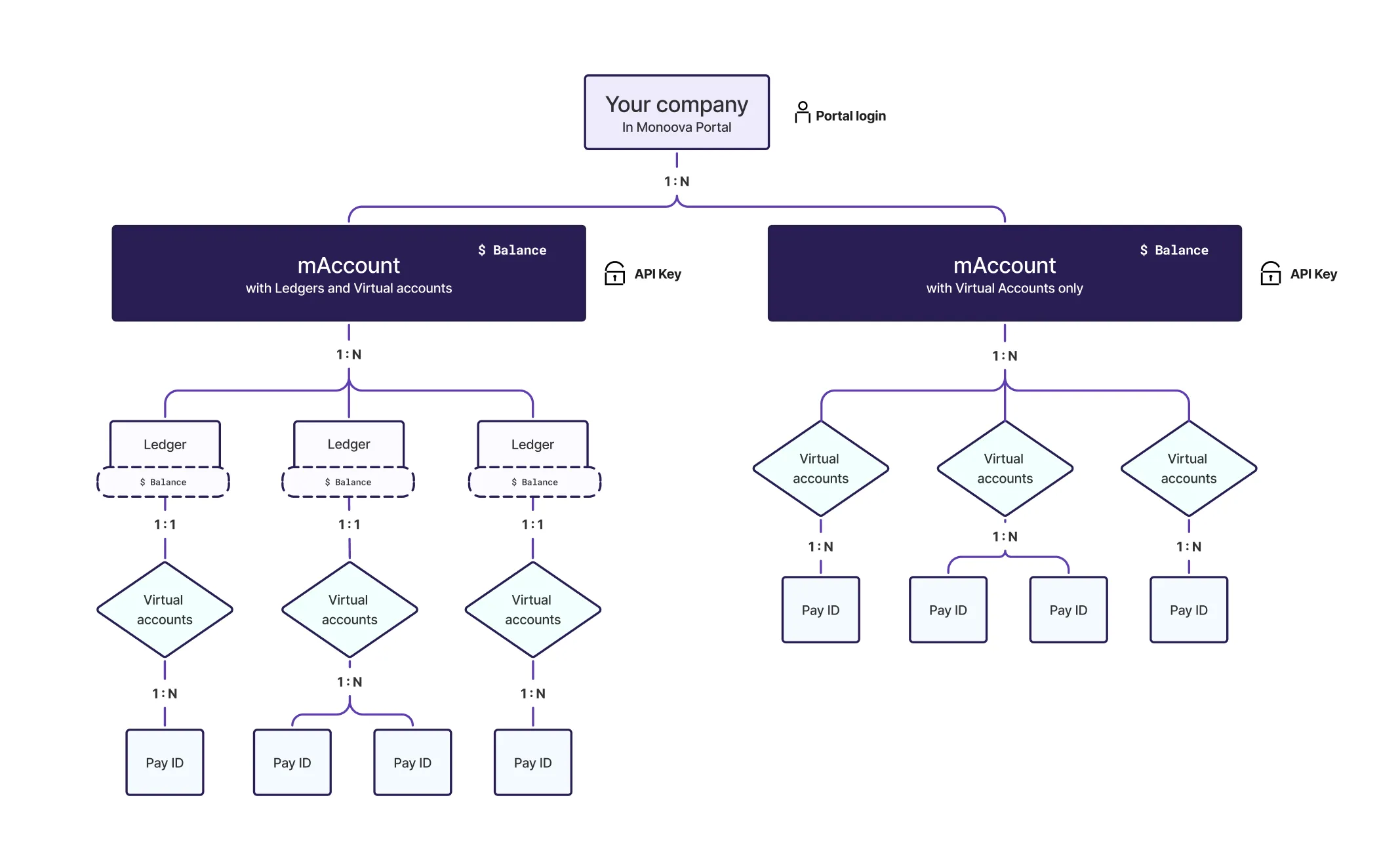
The diagram below shows how the structure nests inside Monoova: Company → mAccount → (optionally Ledgers) → Virtual accounts → PayIDs
Layer by layer
Your company (Monoova Portal sign in) — the top-level customer entity. Access at this level is via Portal login.
mAccount — the funded account. Two things are attached to it in both branches:
- Available funds balance.
- API Key — access is scoped per mAccount, not per company. Portal login is company-wide, but each mAccount carries its own API Key, so integrations are isolated per mAccount.
Ledger — an mAccount can have 1:N to Ledgers. Each ledger holds its own balance, and the ledger balance is separate to the parent mAccount balance.
Virtual Accounts — the addressable receiving identity (BSB and account number). These addresses do not hold balances unless linked to a ledger.
- Ledger-based setup: Ledger 1:1 to Virtual Account — exactly one Virtual Account per ledger. In this set up the ledger effectively tracks the balance and transaction history for the virtual account.
- Virtual Account-only setup: mAccount 1:N to Virtual Accounts — many Virtual Accounts can connect straight off the mAccount, and none of them holds a balance. All inbound funds will settle to the mAccount balance in this case.
PayID — each Virtual Account can have 1:N to PayIDs. A single Virtual Account can have multiple PayIDs aliases.