
FX Transactions with a single settlement
Clients who wish to execute multiple FX transactions with a single consolidated settlement to a beneficiary can leverage the 'Hold Funds on Account' feature. This functionality enables automatic settlement of all associated FX transactions, streamlining them into a single payout to the designated beneficiary.
Step 1. Retrieve FX Rate.
This will display the rate of the chosen currency pairing.
- Set up Retrieve an FX rate. and enter in the currency pairing (base and counter) with counter currency amount.
{
    "rate": {
        "base_currency": {
            "id": 10004,
            "name": "Australian Dollar",
            "currency_code": "AUD"
        },
        "counter_currency": {
            "id": 10001,
            "name": "US Dollar",
            "currency_code": "USD"
        },
        "exchange_rate": "0.6605",
        "updated_date": "2025-09-18T15:31:35+10:00"
    }
}
Step 2. Create FX Transaction.
To create a transaction, API requires a currency pairing with "Hold funds on Account" assigned as the beneficiary.
- Create a transaction quote. by entering the currency pair (sell currency and buy currency) along with the buy currency amount. In the same sequence, include the 'Hold Funds on Account' beneficiary ID of the buy currency, enter in the value date and re-confirm the buy currency amount.
{
    "transaction": {
        // "base_currency_id": 10001,                             // Provide one of base_currency_id or base_currency_code
        "base_currency_code": "AUD",                              // Provide one of base_currency_id or base_currency_code
        // "counter_currency_id": 10004,                          // Provide one of counter_currency_id or counter_currency_code
        "counter_currency_code": "CNH",                           // Provide one of counter_currency_id or counter_currency_code
        // "counter_currency_code": "", // Provide one of counter_currency_id or counter_currency_code
        // "base_currency_amount": "1,234.56",                    // Provide one of base_currency_amount or counter_currency_amount
        "counter_currency_amount": 123.45,                         // Provide one of base_currency_amount or counter_currency_amount
        // "value_date": "2025-06-03"                             // Optional
        // "receipt_payment_mode": "electronic_fund_transfer",    // Optional, one of [electronic_fund_transfer, available_funds]
        // "receipt_account_id": 10001,                           // Optional, for settling via electronic_fund_transfer

        "payments": [                                             // Optionally provide payment information when creating the quote
            // {
                "beneficiary_id": :beneficiary_id,
                // "payment_reference": "I-123456",                  // Optional
                // "payment_type": null,                             // Optional, one of ['CHAPS', 'Faster', 'MCCY', nil]
                // "transaction_reason_id": 10341,                // Provide one of transaction_reason_id or transaction_reason_name
                // "transaction_reason_name": "Purchase of Inventory",    // Provide one of transaction_reason_id or transaction_reason_name
                // "transaction_reason_other": "Something else",     // Provide one of transaction_reason_id or transaction_reason_name
                "amount": 123.45
            // }
        ]
    }
}
- To obtain 'Hold Funds on Account' ID, Retrieve beneficiaries. and enter in the currency code of your buy amount eg USD. The search result will provide the ID of the "Hold Funds on Account". Enter this ID as the beneficiary ID in the create a transaction quote
curl --location 'https://sand-api.monoova.com/global/v1/beneficiaries'- Once all the details are entered, a transaction quote will be generated shown in 'created' status. You will find the deal "ID" under transaction.
{
    "transaction": {
        "id": 210893,
        //"customer_id": 12905,
        //"user_id": 13392,
        //"status": "created",
        //"status_label": "Created",
        //"base_currency": {
            //"id": 10004,
            //"name": "Australian Dollar",
            //"currency_code": "AUD"
        },
Step 3. Confirm FX Transaction
All transactions marked as 'created' will need to be confirmed. Once confirmed, the transaction becomes a binding payment agreement.
- To Confirm a transaction quote. it will require 'transaction- ID' and placed in the call sequence. The transaction status will change from 'created' to 'pending payment'.
curl --location -g --request POST 'https://sand-api.monoova.com/global/v1/transactions/{{transaction_id}}/confirm'- After confirming the transaction, it must be verified that all payments are fully allocated to it (Confirm that the payments are fully allocated to a transaction.). This ensures that the total buy currency amount is completely covered by the payments. Once this step is completed, payments can no longer be edited, and the transaction details are finalised. At this point, the transaction status will change from 'pending payment' to 'open', indicating that it is now awaiting payment.
curl --location -g --request POST 'https://sand-api.monoova.com/global/v1/transactions/{{transaction_id}}/confirm_payments'Step 4. Settlement
During the settlement phase, transactions can instantly settle via NPP payments.
- Bank details (BSB and Account Number) are provided in the transaction confirmation response.
   //"base_currency_amount": "14.99",
        //"counter_currency_amount": "70.00",
        //"receipt_amount": "14.99",
        //"receipt_account": {
            //"id": 10040,
            //"name": "AUD Account",
            "receipt_text": "BSB: 802-985\nAccount Number: 115727675\nPayID: \n",
            //"bank_account": {
                //"account_number": "115727675"
}- To make a payment via NPP, you must include the correct sell amount and transaction ID. If the payment details do not exactly match the transaction information, the payment will not settle automatically and will require manual intervention, potentially causing delays.
It is crucial to add a 'C' in front of the deal ID—for example, '210532' should be entered as 'C210532'.
{
    "transaction": {
        "id": 210932,
        //"customer_id": 12905,
        //"user_id": 13392,
        //"status": "open",
       // "status_label": "Open",
       // "base_currency": {
            //"id": 10004,
            //"name": "Australian Dollar",
            //"currency_code": "AUD"
        },
        //"counter_currency": {
            //"id": 10221,
            //"name": "Chinese Yuan Hong Kong",
            //"currency_code": "CNH"
        },
        "base_currency_amount": "14.99",
        //"counter_currency_amount": "70.00",
        //"receipt_amount": "14.99",
        //"receipt_account": {
            //"id": 10040,
            //"name": "AUD Account",
            //"receipt_text": "BSB: 802-985\nAccount Number: 115727675\nPayID: \n",
            //"bank_account": {
                //"account_number": "115727675"
            }
        },
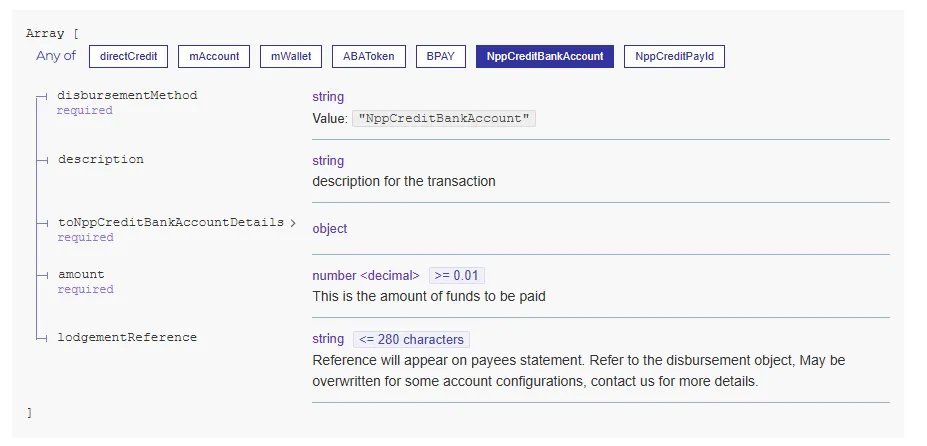
To make a payment through Monoova's Domestic portal, the 'lodgementReference' field must include the deal ID in the format CXXXXXX, and the 'amount' field must contain the correct sell amount.
Step 5. Sending payment to Beneficiary
You can view your buy currency balance, which will automatically update as soon as funds become available. To make a payment to your beneficiary, you’ll need to initiate a withdrawal to transfer the funds.
- To Create a withdrawal from the customer's account. you will need to Retrieve beneficiaries. stored in your account. Once you have selected the beneficiary, entering the desired amount to be sent.
Note: please see Creating a new beneficiary Sequence for adding new beneficiaries.
{
    "transaction": {
        "beneficiary_id":"{{beneficiary_id}}",
        //"payment_reference": "test payment", // Optional payment_reference
        //"payment_type": null, // Optional payment_type ['CHAPS', 'Faster', 'MCCY', nil]
        //"transaction_reason_id": "12357", // Optional transaction reason (by id)
        //"transaction_reason_name": "Investment", // Optional transaction reason (by name)
        // "transaction_reason_other": "Foreign Investment", // Optional customer transaction reason

        "amount": "{{amount}}"
    }
}- There are additional fields that are required based on the location of the beneficiary such as 'payment reference', Retrieve a remuneration type. and Retrieve transaction reasons.
- Once the withdrawal request has been created, it will need to be confirmed. Please Confirm a withdrawal. with the transaction id provided in the create request.
{
    "transaction": {
        "id": 211063,
        //"customer_id": 12905,
        //"user_id": 13392,
        //"status": "settled",
        //"status_label": "Settled",
        //"base_currency": {
            //"id": 10221,
            //"name": "Chinese Yuan Hong Kong",
            //"currency_code": "CNH"
        },
        //"counter_currency": {
            //"id": 10221,
            //"name": "Chinese Yuan Hong Kong",
            //"currency_code": "CNH"
        },
        //"base_currency_amount": "100.00",
        //"counter_currency_amount": "100.00",
        //"receipt_amount": "100.00",
        //"receipt_account": {
            //"id": 10029,
            //"name": "UAT Receipt account details",
            //"receipt_text": "UAT Settlement Text",
            //"bank_account": null
        },
        //"fees": "0.00",
        //"payments": [
            {
                //"id": 160332,
                //"status": "pending",
                //"amount": "100.00",
                //"fee": "0.00",
                //"beneficiary": {
                    //"id": 24323,
                    //"name": {
                        //"first_name": "Monoova Global  Payments Pty Ltd",
                        //"middle_name": null,
                        //"last_name": null
                    },
                    //"status": "approved_by_client",
                    //"country": {
                        //"id": 10004,
                        //"name": "Australia",
                        //"country_code": "AUS"
                    },
                    //"currency": {
                        //"id": 10221,
                        //"name": "Chinese Yuan Hong Kong",
                        //"currency_code": "CNH"
                    },
                    //"created_date": "2025-07-29T14:01:27+10:00",
                    //"updated_date": "2025-07-29T14:07:00+10:00"
                },
                //"payment_reference": null,
                //"payment_type": null,
                //"created_date": "2025-09-26T13:42:45+10:00",
                //"updated_date": "2025-09-26T13:42:45+10:00"
            }
        ],
        //"exchange_rate": "1.0000",
        //"value_date": "2025-09-26",
        //"created_date": "2025-09-26T13:42:45+10:00",
        //"updated_date": "2025-09-26T13:43:31+10:00"
    }
}